+34 km
Quickly check if you are ahead of yourself.
ChaseMe is an iPhone and iPad app that compares your year-to-date workout distance with the same calendar day last year, split by activity. It reads HealthKit in read-only mode, keeps your workout data on device, and gives you a fast answer: ahead, on pace, or behind.

Year-to-Date Scorecard
Through today vs same day last year
+1 km
-21 km
+11 km
Compare against yourself, not strangers
ChaseMe is about personal consistency over a full year, not social leaderboards, public sharing, or training-race pressure.
Same calendar day, every time
Every comparison is anchored to the equivalent day last year, so an April score is compared with April, not with last year's full December total.
No single blended total hiding the story
Running, walking, cycling, swimming, hiking, and other distance-based activities are compared separately so you can see where the year is being won or lost.
Three steps to your scorecard
ChaseMe is straightforward to use in three steps. It requires HealthKit workout read access and, once connected, builds the scorecard locally from your distance-based workouts and generates the relevant insights automatically.
Connect HealthKit
Grant read-only access to workouts with distance. ChaseMe does not write anything back to Apple Health, but it cannot function without this permission.
See your scorecard
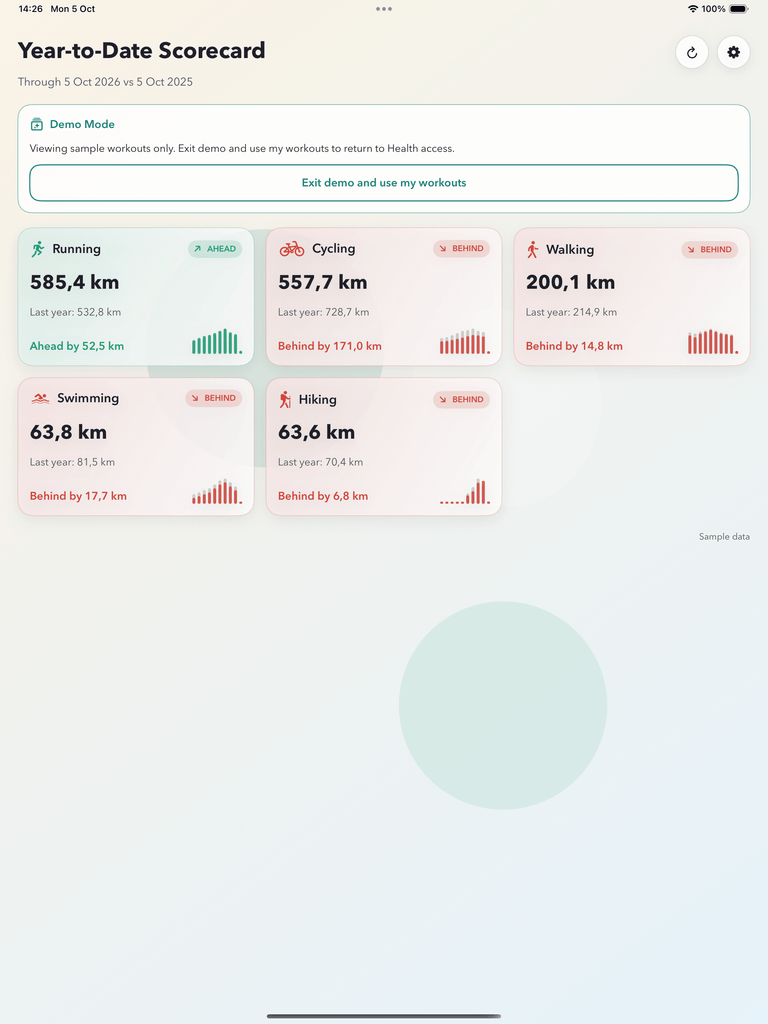
The app shows year-to-date totals for each detected activity and labels them Ahead, On Pace, or Behind versus the same day last year.
Drill into one activity
Open an available activity card to inspect the cumulative trend, year-to-date totals, monthly breakdown, and pace insights.
See the year activity by activity, with the status model up front
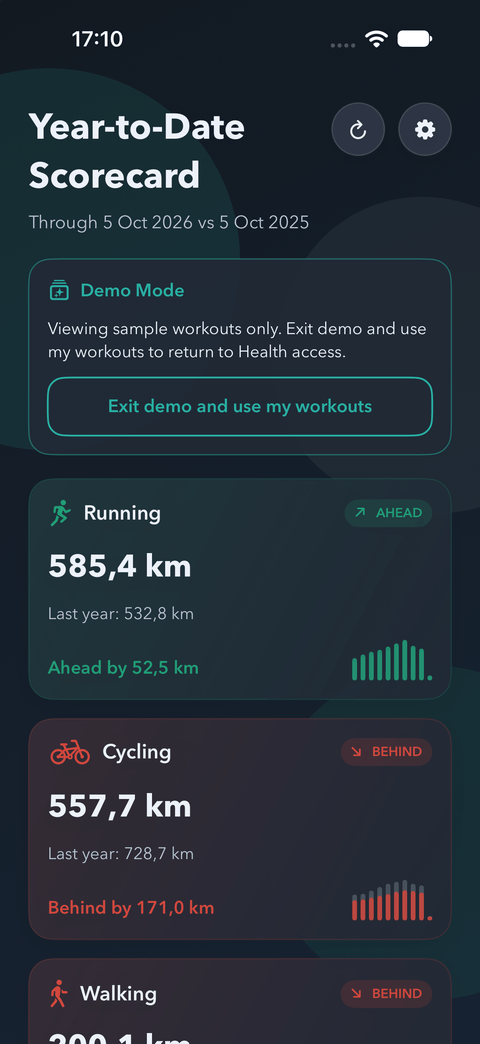
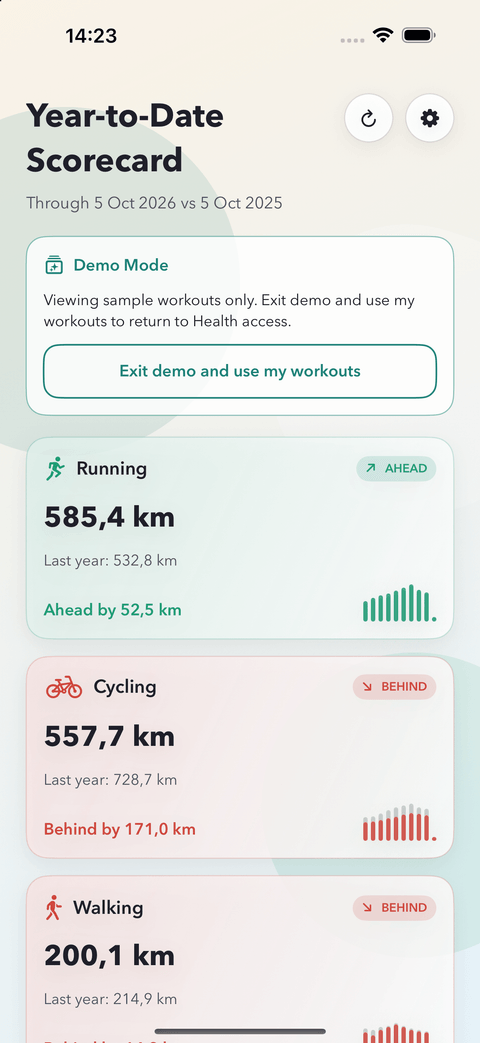
The scorecard is the core of ChaseMe. Every activity card shows this year's year-to-date total, last year's equivalent total, the delta, and a fast visual shape comparison.
Tiny differences stay On Pace. Larger gaps become Ahead or Behind. The point is quick, honest pacing feedback that you can understand in seconds.
Year-to-Date Scorecard
Through today vs the same day last year
Delta: +34 km
Delta: +1 km
Delta: -21 km
Delta: +11 km
Running detail
Open one activity and inspect the year properly
Selected day: 412 km this year vs 378 km last year
Deeper insight without turning into a noisy training dashboard
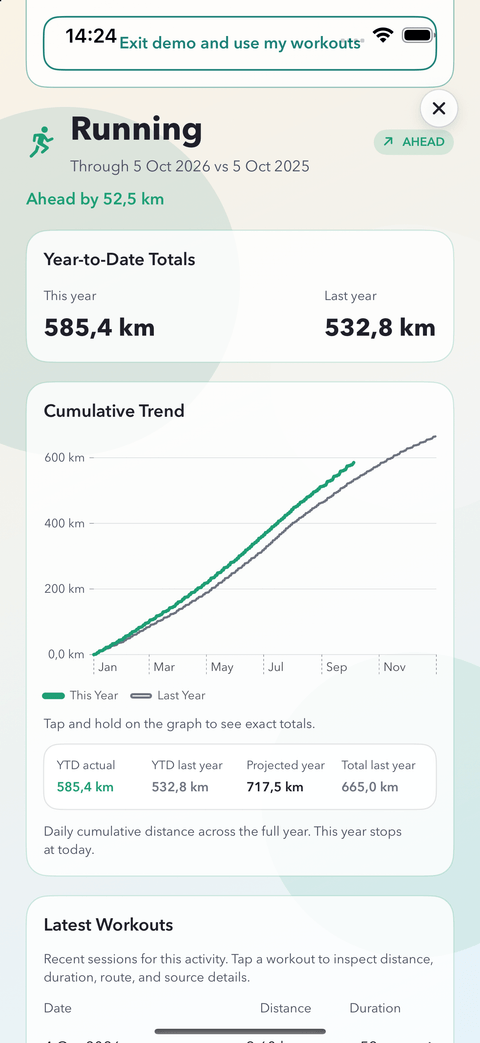
Open a single activity and ChaseMe moves from a simple status to a proper explanation. The detail view shows the cumulative trend across the year, the year-to-date totals, the projected year-end outcome, and the monthly comparison that explains where the gains or losses are happening.
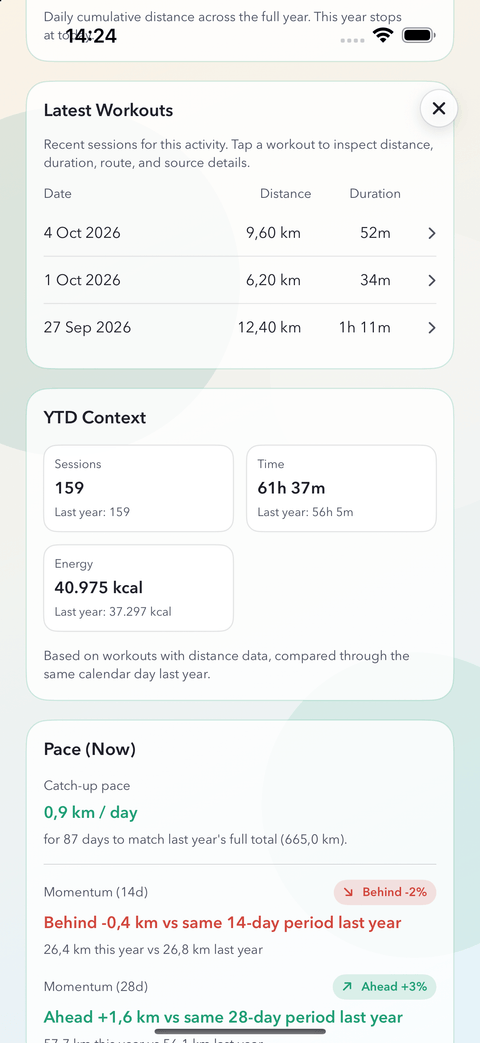
It stays focused on pacing and consistency rather than turning into a generic fitness dashboard. You can see how far you are from last year, what daily catch-up pace would be needed, how consistent the activity has been, and where the year is shifting month by month.
- Cumulative trend chart for this year vs last year, with exact selected-day totals
- KPI summary for YTD actual, YTD last year, projected year, and last year total
- Catch-up pace, active days, current streak, contribution split, and milestone context
- Monthly accountability instead of vague motivational language
- Pro expands this with momentum, advanced consistency, performance mix, milestones, and the full monthly breakdown
Inspect recent sessions, not just yearly totals
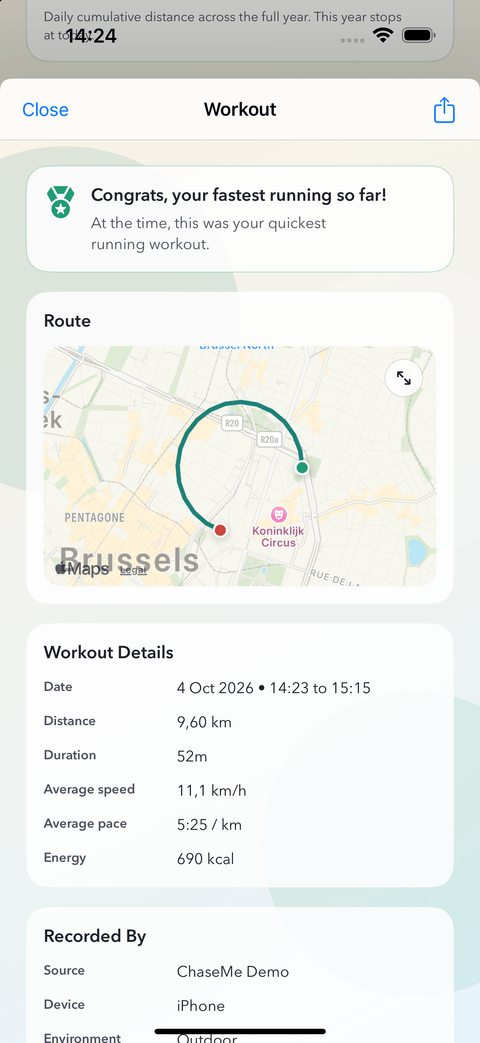
Each activity can open into a recent-workout history, so ChaseMe does not stop at the year-to-date scorecard. From there, you can open an individual workout and inspect the session more directly.
- Recent workout history is shown inside each activity detail view
- Each workout row can open a dedicated drill-down modal
- Route previews are supported when Apple Health stored route data for that workout
- If no route exists, the workout still shows useful stat detail
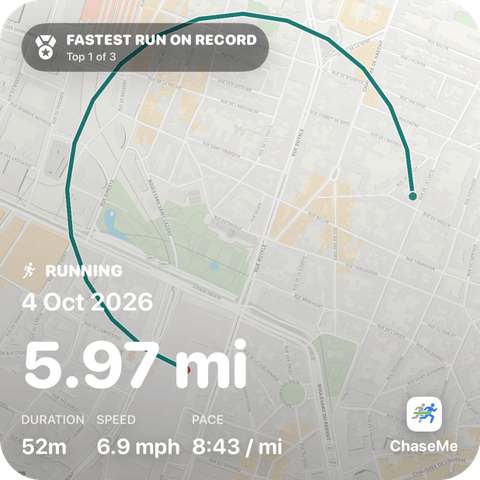
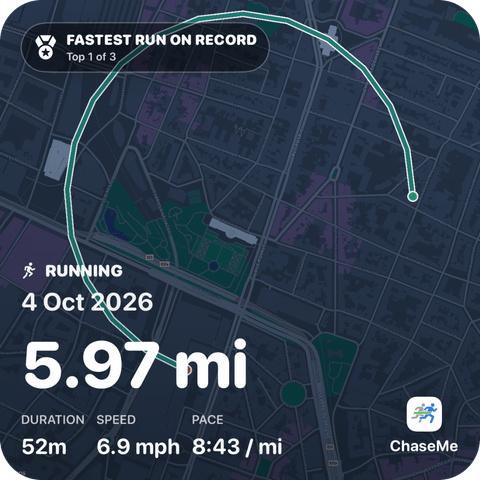
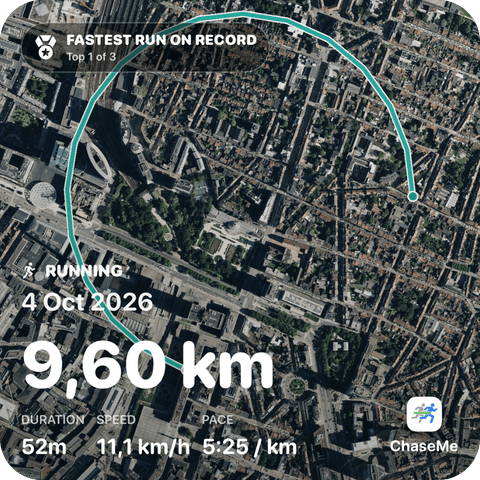
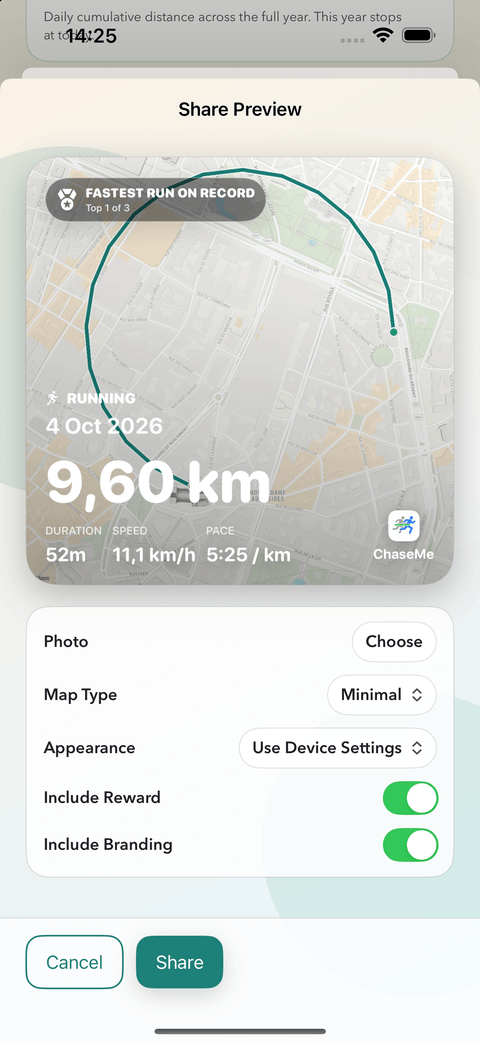
Generate a workout image locally on your iPhone
ChaseMe can generate a square workout image from the workout drill-down, ready to be shared via iOS. That export happens locally on-device, without sending your workout data to Coding Mammoth servers.

ChaseMe in action
The core logic stays consistent across the app: a fast scorecard, focused activity detail, and deeper insight screens when you want more context.
Start Free, Go Pro for More Depth
ChaseMe is free to download and use, with Running, Walking, and Cycling included in the base app. Pro expands both activity coverage and insight depth through monthly or yearly Apple subscriptions.
Free already gives a real scorecard, activity detail, recent workout preview, and core pacing signals. Pro is for people who want all detected distance-based activities plus the deeper insight layers and cleaner export options that explain how the year is unfolding.
| Included | Free | Pro € 9.99 yearly or € 1.99 monthly |
|---|---|---|
| Running, Walking, and Cycling | Included | Included |
| Other detected distance-based activities | Pro only | Included |
| Core scorecard and Ahead / On Pace / Behind status | Included | Included |
| YTD totals and cumulative trend | Included | Included |
| Catch-up pace insight | Included | Included |
| Core insight cards: active days, current streak, contribution split, and last year's YTD milestone | Included | Included |
| Advanced pace and consistency: momentum, longest streak, volatility, and trend signal | Pro only | Included |
| Advanced performance and milestones: best month, biggest gap, and full-year milestones | Pro only | Included |
| Monthly breakdown | Limited | Included |
| Recent workout history per activity | Limited | Included |
| Workout image export | Included | Included |
| Brandless workout image | Pro only | Included |
Payments are handled entirely by Apple through your Apple Account. Family Sharing is supported through Apple's purchase and subscription sharing features, so eligible family members can unlock ChaseMe without buying a separate copy. Purchase Sharing and Family Sharing.
Built for people who want to challenge themselves
- Runners, walkers, and cyclists who already track workouts in Apple Health
- Multi-sport users who want one scorecard without flattening everything into one total
- People comparing against their own history instead of social leaderboards
- Users who want to know if the year is tracking well, not analyze every biometric
- People whose seasonal activities only show up later in the year
All insights are based on your real workouts in Apple Health
ChaseMe builds the activity list from the distance-based workouts it observes this year and last year. That means activities like swimming, hiking, skiing, or paddle sports can still surface when they matter, even if they only appear later in the year.
Distance-based workouts only. Workouts without distance are excluded from the model.
Privacy-friendly by design, with clear limits
ChaseMe sets the right expectations up front: what it reads, what it does not do, and what kind of workout data it can actually use.
Read-only HealthKit
ChaseMe reads workout data from HealthKit in read-only mode. It does not write data back to Apple Health.
Workout data stays on device
Your workout data is not uploaded to Coding Mammoth servers and is not shared publicly. Apple handles billing, and RevenueCat supports subscription management inside the app.
Purpose-built scope
ChaseMe is for distance-based workouts only. It does not add heart-rate analytics, calorie tracking, coaching, recovery scoring, HealthKit write-back, or social features.
Short answers to the practical questions
ChaseMe is intentionally narrow: HealthKit workouts in, year-over-year scorecard out. These are the questions that matter most before you install it.
Which data does ChaseMe access?
ChaseMe reads your Apple Health workouts in read-only mode and uses the workout distance data it needs to build the scorecard and activity detail views. It does not write anything back to Health. If you open an individual workout later and want a map preview, ChaseMe can optionally request workout-route access at that point, but route access is separate from the core app and never required for the main scorecard.
Is my data shared?
No health or workout data is uploaded to Coding Mammoth servers. ChaseMe processes your workout data locally on your iPhone and is built around a privacy-by-design model. Apple handles billing, and RevenueCat supports subscription and entitlement flows, but your HealthKit workout data stays on device.
Why don't I see my workouts?
ChaseMe only works with readable distance-based workouts. If your scorecard is empty, first confirm that ChaseMe can read Workouts in Apple Health:
Health app → profile picture → Apps → ChaseMe → allow Workouts. If you want route previews later, enable workout-route access there too. Then return to ChaseMe and refresh. Apple's general Health app help is here: Use the Health app on iPhone.
How do payments and plans work?
ChaseMe is free to download. Running, Walking, and Cycling are included in the Free plan. Pro unlocks all detected distance-based activities and the deeper insight layers described above. Because the app keeps workout data local and does not depend on a backend for your Health data, the Pro plan is primarily there to support ongoing development of ChaseMe. Pro costs € 9.99 per year or € 1.99 per month. Monthly and yearly subscriptions are both managed by Apple. Refunds and billing questions also go through Apple via Report a Problem or Apple Billing and Subscriptions.
Does ChaseMe work without Apple Health?
Not for your real data. ChaseMe needs HealthKit workout read access to build the scorecard. If you want to inspect the app before granting access, there is a session-only demo mode with sample workouts.
Which workouts will appear in ChaseMe?
ChaseMe derives activities from the distance-based workouts it actually finds in Apple Health. That means common activities like running, walking, cycling, swimming, hiking, or skiing can appear when they exist in your history, while workouts without usable distance data stay outside the model.